
Overview
Barasingha, a cybersecurity solutions provider, wanted to develop a tool to help enterprises monitor and mitigate data leakage risks on WhatsApp. Designed for IT and compliance teams, the platform allows policy creation, detects high-risk behavior, and enables action on violations—without compromising employee privacy. It offers real-time alerts, trend analysis, and department-level insights to safeguard sensitive communication.
Tools
Duration
4 months
My Role
Collaborated with founder and PM to understand and gather requirements.Conducted workshops with PM and dev to prioritize identified opportunities.
Conducted research to identify user needs and validated designs through usability testing.Collaborated with legal team for identifying correct language and disclaimers.
Created wireframes and high fidelity mockups for dev handoff.
Collaborated with director and founderto brainstorm implementation strategy and identify features for MVP.
Developed a figma UI library to maintain design consistency in the future and to visually align with existing suite of products.
scam attempts prevented by MVP
The Problem
WhatsApp is widely used across enterprises—especially by employees in sales, support, logistics, and manufacturing—for fast, informal communication with clients, vendors, and colleagues.While convenient, this has led to:
Accidental data leakage, such as sharing payment details, invoices, or internal designs.
Impersonation scams, where attackers pose as leadership or clients to request sensitive information
The Goal
Design a data leakage protection tool that enables enterprises to:
Monitor WhatsApp activity on official numbers while preserving employee privacy.
Define and enforce custom compliance policies with automated actions for violations
Track and analyze violations in real time to identify risky users, departments, and behavioral trends.

Diving into the process
Research
Before the MVP, direct user research wasn’t possible. Instead, I aligned with the Product Manager and Company Director on business goals, and leveraged insights from sales distributors who work closely with IT admins and compliance teams. After launch, I gathered direct feedback from IT admins to validate and refine the product.
Key insights
01
Admins prefer outcomes, not constant monitoring
IT teams did not want to sit inside the tool all day. They preferred summaries and alerts via email or WhatsApp, enabling action only when needed.
02
Monitoring state needed clarity
Admins needed clear visibility into when users were connected, disconnected, and what data could or could not be monitored.
03
Policy creation needed to be fast and scalable
Admins wanted policy templates, not complex rule-building from scratch
04
Multilingual complexity
Employees often communicated in regional languages—sometimes written using English alphabets—requiring broader language detection.
User Personas
Primary
IT Admin
Responsible for enforcing policies, monitoring risk, and responding to incidents
Needs
Detect risks in data sharing
Create and manage policies at scale
Maintain audit trails for investigations
Secondary
Compliance Head
Oversees organizational risk and regulatory exposure
Needs
High-level visibility into risk trends
Confidence in enforcement and reporting
Documentation for audits and legal cases
Design decisions & Iterations
#1
MVP scoping — what we deliberately left out
Three scoping calls traded flexibility for audit clarity and on-time delivery.
01.
No policy editing
Editing introduced versioning & audit ambiguity. MVP policies could not be edited — only deleted and recreated (team assignments editable)
Audit clarity over flexibility.
02.
Keyword based monitoring
MVP focused on keyword detection with media monitoring tied to keywords. Architecture left open for future policy expansions.
Faster delivery, clearer explainability
03.
No star/end dates for policies
Time-bound policies added enforcement & reporting complexity disproportionate to MVP value.
Deprioritised to reduce risk
#3
Designing for number recycling
Company-owned WhatsApp numbers are frequently reassigned. Without safeguards, violations could be wrongly attributed to the new employee. I introduced a time-bound identity mapping:
Violations were only associated from the moment a number was officially assigned.
This ensured audit-safe attribution, prevented historical mislabeling, and preserved employee trust.
Violation
19 Dec 2024
Number
+91 90123•••
Employee
by assignment date
#3
Dashboard: practical over performative
Most IT admins aren't visualization experts. I replaced an early stacked bar graph for violations by team with a tabular view for readability. It's the most critical metric — but placing it first would push other summaries out of the viewport, so I positioned it last to preserve balance. The final dashboard leans on tables, donut proportions and time-series.
Before
Single page policy for policy building


After
Policy building broken down into multiple steps


#3
Policy creation: from overwhelming to structured
The initial wireframe explored a single-page policy building model, exposing every control at once. As the logic expanded, it became cognitively heavy and hard to scale. I moved to a multi-step flow — a pattern enterprise security competitors rely on — separating rules, scope, and actions so admins configure progressively instead of all at once.
Before
Single page policy for policy building

After
Policy building broken down into multiple steps

#3
Balancing multilingual monitoring with performance
Employees communicate across many languages — often writing regional languages in English letters. Monitoring everything by default was ideal, but carried real performance cost.
English monitored by default
Admin-selected Indian languages, opt-in
Support for transliterated text
Reflected how India actually chats, without taxing the system.

#4
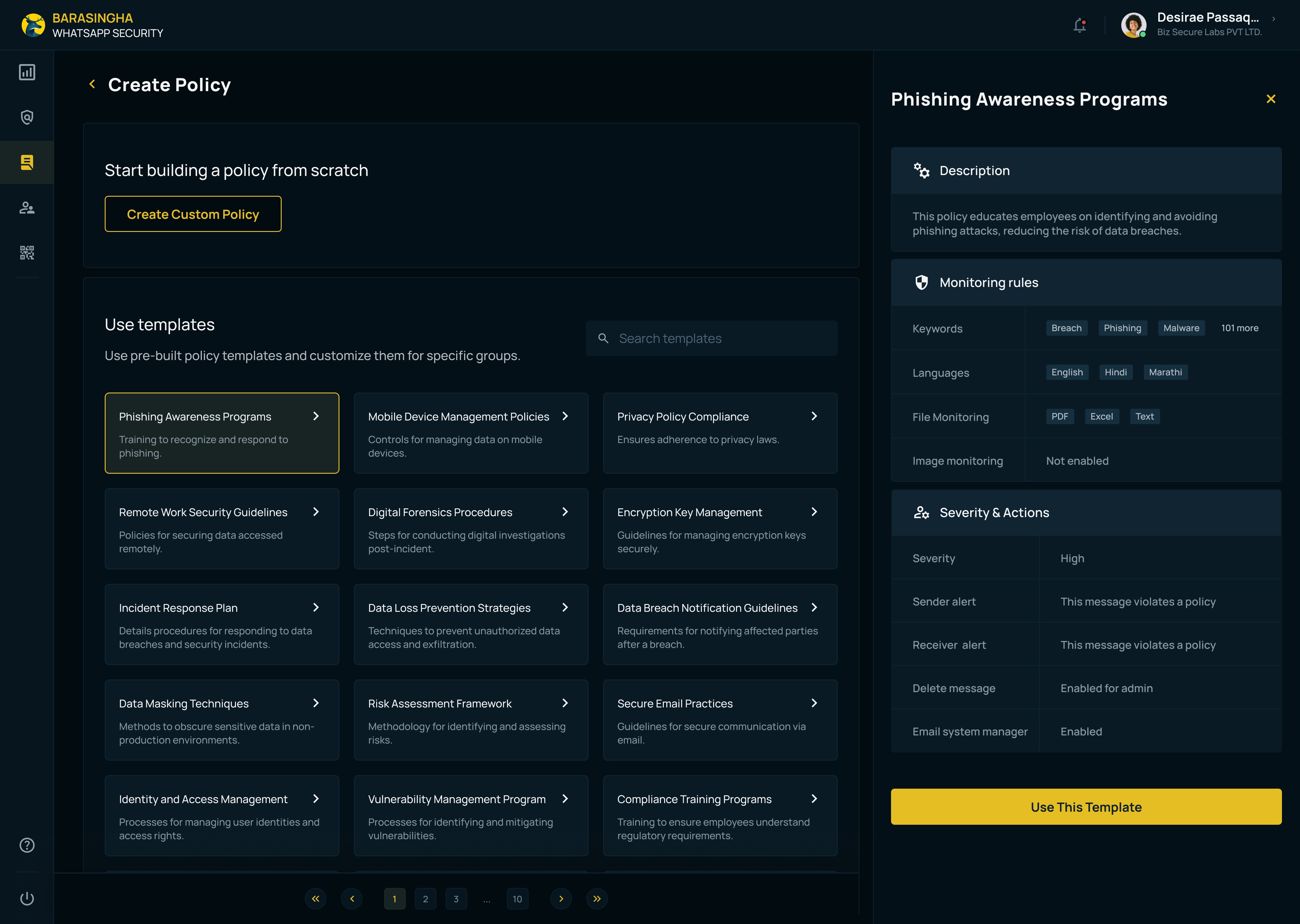
Introducing policy templates
Sales insights showed IT teams preferred ready-made policy templates over building from scratch. I designed a side-drawer–based template explorer (non-overlay) that allowed admins to browse and compare templates without losing context. The layout dynamically adjusted so existing policies remained visible.
1
Templates cards stay visible so context is not lost and use can select others to view
2
A side drawer, not an overlay — browse & compare in place.
Feedback from users confirmed the interaction enabled confident, flexible decision-making without overwhelming users
2
1
#5
Preserving context without mimicking chat
Admins investigating violations needed visibility into the exact message that triggered the policy, and in some cases, the ability to review an employee’s chat history. An early concept displayed this within a WhatsApp-style interface. I rejected this because it blurred the boundary between monitoring and participation and increased perceived invasiveness.
I designed a distinct interface to support audit where:
The violatory message was clearly highlighted
10 messages before and after were shown for context
Full chat access was structured and purposeful within the violation flow
Before
Whatsapp like interface

After
Distinct interface to support audit

Learnings
Systems thinking is important to provide a cohesive experience across multiple touch-points during and post purchase.
Involving dev team in design process through workshops can elevate their enthusiasm for the project, leading to smoother collaboration.